
Loading...
> docs/claws-explained
Understanding Claws (Credits)
6 min read
Billing
Last updated April 03, 2026
What Are Claws?
Claws are optional. Most users run monthly subscriptions and never need Claws. You only need Claws if you (a) choose daily billing for flexible pay-as-you-go hosting, or (b) exceed your free managed LLM usage limits.
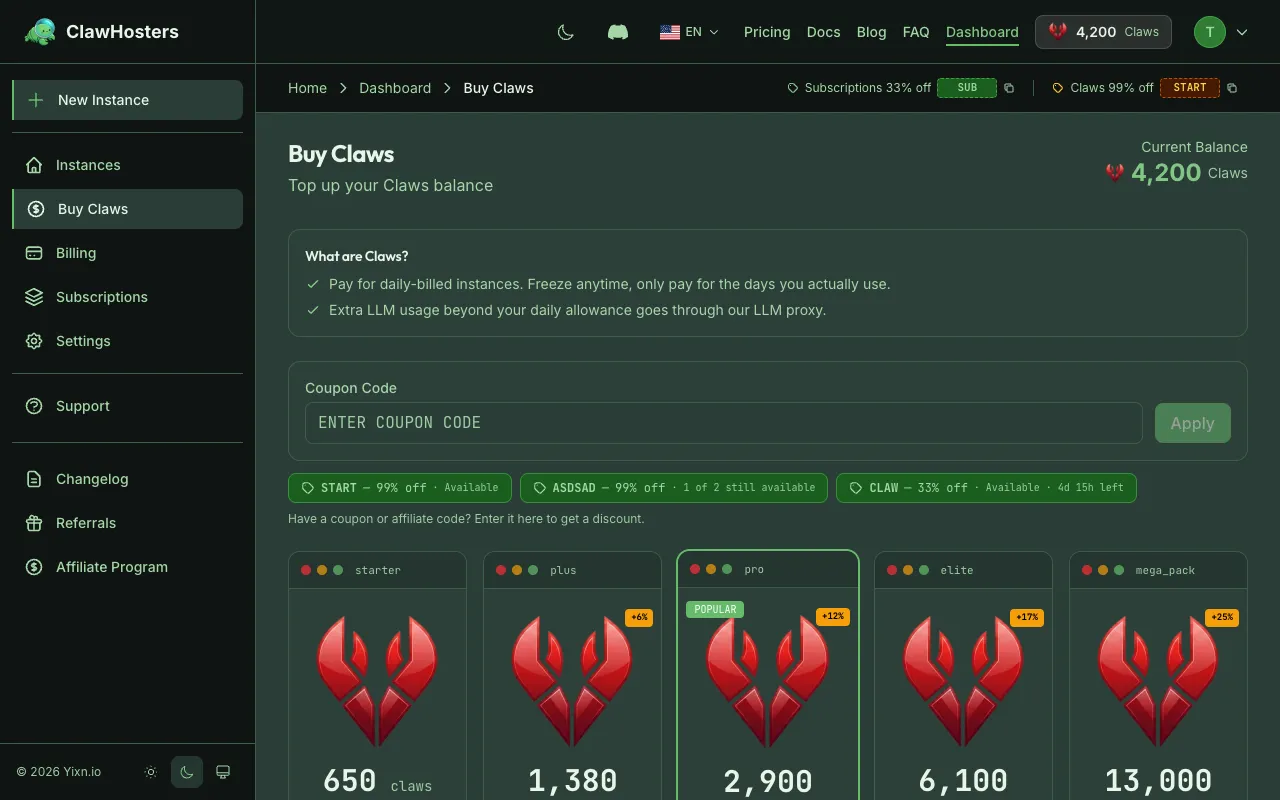
Claws are the prepaid credit currency on ClawHosters. Instead of paying per day in euros directly, you purchase Claws up front and your running instances deduct from that balance daily.
The system works like a prepaid phone plan. Buy credits, use them, top up when you run low.
How the Exchange Rate Works
The base rate is 65 Claws per 1 EUR. This conversion is fixed and applies to all transactions.
Some examples:
| Claws | EUR Equivalent |
|---|---|
| 65 | €1 |
| 650 | €10 |
| 1,300 | €20 |
| 6,500 | €100 |
When you view transaction history or invoices, amounts are shown in both Claws and their EUR equivalent.
Claws Packages
You purchase Claws in predefined packages. Larger packages include bonus Claws, so your effective rate improves:
| Package | Price | Claws | Bonus | Effective Rate |
|---|---|---|---|---|
| Starter | €10 | 650 | - | €0.0154/Claw |
| Plus | €20 | 1,380 | +6% | €0.0145/Claw |
| Pro | €40 | 2,900 | +12% | €0.0138/Claw |
| Elite | €80 | 6,100 | +17% | €0.0131/Claw |
| Mega Pack | €160 | 13,000 | +25% | €0.0123/Claw |
Payment is processed through Stripe (credit/debit card) or Coinbase Commerce (cryptocurrency). Claws are credited to your account immediately after payment confirmation.
Daily Costs by Tier
Each instance tier has a fixed daily Claws cost:
| Tier | Daily Cost | Approximate Monthly Cost |
|---|---|---|
| Budget (2 vCPU, 4 GB RAM) | 60 Claws/day | ~1,800 Claws |
| Balanced (4 vCPU, 8 GB RAM) | 105 Claws/day | ~3,150 Claws |
| Pro (8 vCPU, 16 GB RAM) | 175 Claws/day | ~5,250 Claws |
Active add-ons (LLM, Voice, Embeddings, Backups) add to the daily cost. The total daily deduction is the sum of your hosting tier cost plus any active add-on costs.
Setup Fees
When you create a new instance on daily billing, a one-time setup fee is deducted:
| Tier | Setup Fee |
|---|---|
| Budget | 150 Claws |
| Balanced | 300 Claws |
| Pro | 450 Claws |
This fee covers the initial server provisioning. It is charged once at instance creation, not on subsequent days.
How Daily Billing Works
Billing runs every day at 01:00 Berlin time (CET/CEST). Here is what happens:
- The system checks all running daily-billed instances
- For each instance, it calculates the total daily cost (hosting + add-ons)
- The cost is deducted from your Claws balance
- A transaction record is created (visible in your billing history)
If you create an instance partway through the day, the first day's charge is prorated based on the remaining hours.
How Long Your Claws Last
To estimate how long a package will last, divide the Claws by your daily cost:
Budget tier (60 Claws/day):
| Package | Claws | Days of Hosting |
|---|---|---|
| Starter | 650 | ~10 days |
| Plus | 1,380 | ~23 days |
| Pro | 2,900 | ~48 days |
| Elite | 6,100 | ~101 days |
| Mega Pack | 13,000 | ~216 days |
Balanced tier (105 Claws/day):
| Package | Claws | Days of Hosting |
|---|---|---|
| Starter | 650 | ~6 days |
| Plus | 1,380 | ~13 days |
| Pro | 2,900 | ~27 days |
| Elite | 6,100 | ~58 days |
| Mega Pack | 13,000 | ~123 days |
These estimates assume no active add-ons. Add-ons increase the daily cost and reduce the number of days.
Low Balance Warnings
When your balance gets low, ClawHosters sends you email warnings at these thresholds:
- 3 days remaining: Early heads-up to top up
- 2 days remaining: Balance is getting low
- 1 day remaining: Top up now to avoid interruption
The system calculates days remaining by dividing your current balance by your actual daily usage.
What Happens at Zero Balance
When your Claws balance reaches zero:
- Day 0: Your instance is automatically paused. A snapshot (backup) of the server is created and stored. The server itself is deleted to stop charges.
- Day 1: Reminder email sent. "Your data will be deleted in 2 days."
- Day 2: Final warning. "Your data will be permanently removed in 1 day."
- Day 3: The snapshot is deleted. Your instance data is permanently gone.
Warning: After 3 days at zero balance, your instance data cannot be recovered. Top up before the grace period expires.
Resuming After Pause
If you top up your Claws balance while your instance is paused (within the 3-day grace period):
- The system detects your balance is sufficient again
- A new server is created from your snapshot
- Your instance resumes where it left off
- The snapshot is removed
This happens automatically. No manual action needed beyond purchasing more Claws.
Daily vs Monthly Billing
ClawHosters offers two billing modes. Here is how they compare:
| Daily (Claws) | Monthly (Subscription) | |
|---|---|---|
| Payment | Prepaid Claws balance | Stripe auto-renewal |
| Rate | Premium (flexibility surcharge) | Lower fixed rate |
| Commitment | None, stop anytime | Monthly cycle |
| Setup fee | Yes (one-time) | No |
| Low balance risk | Yes, auto-pause at 0 | No, runs until subscription cancelled |
| Best for | Testing, short-term, variable use | Long-term, predictable hosting |
Monthly pricing for reference:
| Tier | Monthly Price |
|---|---|
| Budget | €19/month |
| Balanced | €35/month |
| Pro | €59/month |
Daily billing gives you flexibility. You pay more per day than a monthly subscription, but you only pay for the days you actually use.
Managed LLM Extra Usage
Every ClawHosters instance comes with a free managed LLM subscription. This includes daily and monthly usage limits so you can use AI features without any extra cost under normal usage.
If you exceed those limits, the extra usage is billed in Claws from your account balance. This is the only scenario where monthly subscription users need Claws.
One-time Claws bonus for monthly subscribers: The first time you exceed your managed LLM free tier, ClawHosters automatically credits your account with bonus Claws based on your tier:
| Tier | One-Time Bonus |
|---|---|
| Budget | 100 Claws |
| Balanced | 200 Claws |
| Pro | 350 Claws |
This bonus is a one-time gift to cover occasional spikes. If you regularly exceed the free tier, you can purchase additional Claws packages as needed.
Daily billing users already have a Claws balance, so extra LLM usage is simply deducted from that existing balance.
Viewing Your Balance and Transactions
Your current Claws balance is shown at the top of your dashboard. You can view your full transaction history in the Billing section, which lists every deduction, purchase, and credit with timestamps and EUR equivalents.
Related Docs
- Quickstart Guide. Full setup walkthrough
- Creating Your First Instance. Instance creation including billing mode selection
- Payment Methods. Stripe cards, cryptocurrency, and payment security
Related Documentation
Billing Overview
How Billing Works ClawHosters offers two billing modes: monthly subscriptions and daily Claws bi...
Adding Funds (Top-up)
When You Need to Add Funds This page is for daily billing users. If you use a monthly subscriptio...
Choosing the Right Tier
Available Tiers ClawHosters offers three server tiers. Each tier runs the same OpenClaw software...
