
Loading...
> docs/add-funds
Adding Funds (Top-up)
4 min read
Billing
Last updated March 05, 2026
When You Need to Add Funds
This page is for daily billing users. If you use a monthly subscription, you do not need to buy Claws unless you exceed your managed LLM free tier. See Managed LLM Extra Usage for details.
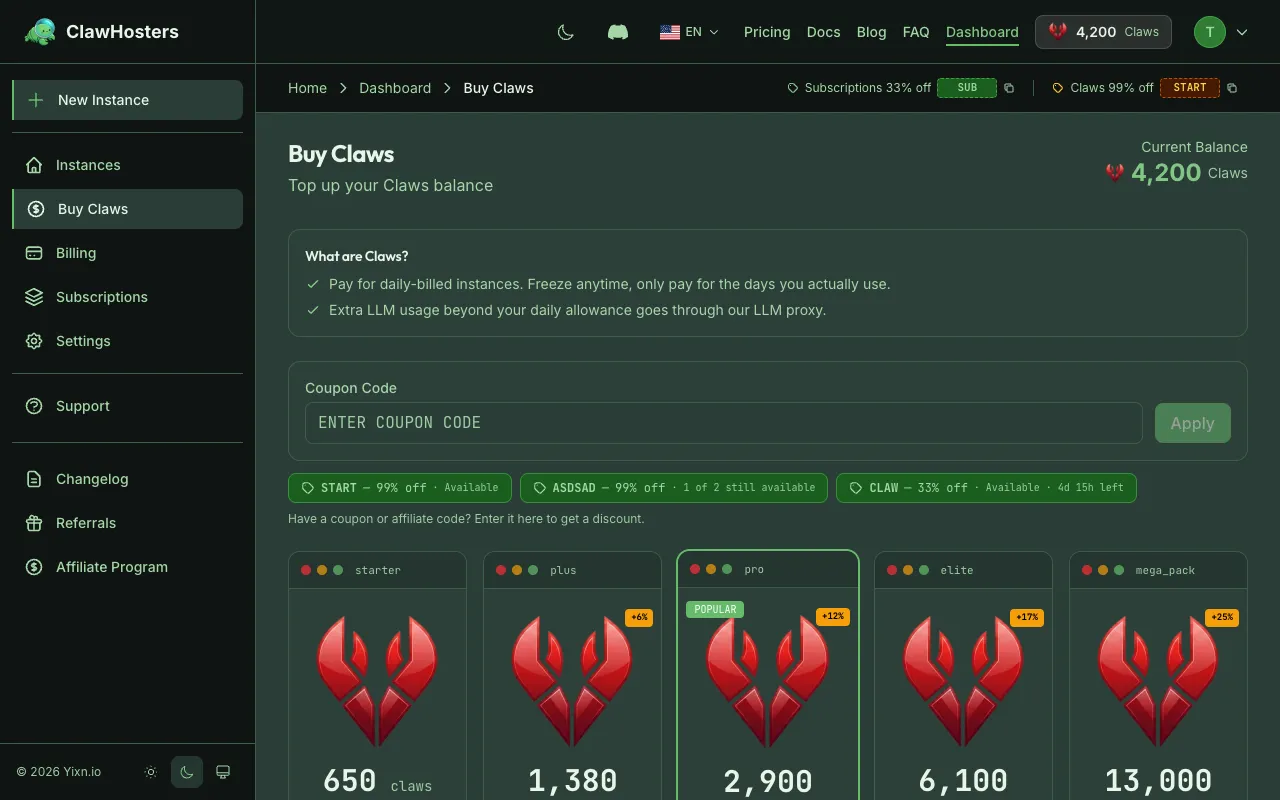
If you use daily billing (Claws), your instances deduct from your balance every day at 01:00 Berlin time (CET/CEST). When the balance gets low, you'll need to top up to keep your instances running.
Monthly subscribers don't need to manage a Claws balance for their base instance cost, but you may still need Claws for setup fees if you create additional daily-billed instances.
Claws Packages
Claws are sold in fixed packages. Larger packages include bonus Claws on top of the base exchange rate (65 Claws per €1).
| Package | Price | Claws | Bonus |
|---|---|---|---|
| Starter | €10 | 650 | - |
| Plus | €20 | 1,380 | +6% |
| Pro | €40 | 2,900 | +12% |
| Elite | €80 | 6,100 | +17% |
| Mega Pack | €160 | 13,000 | +25% |
The bigger the package, the more bonus Claws you get per euro spent.
How to Buy Claws
Via Stripe (Credit/Debit Card)
- Go to your ClawHosters dashboard
- Click Buy Claws (or navigate to the billing section)
- Select a Claws package
- Enter your card details (or use a saved card)
- Confirm the purchase
Claws are credited to your account immediately after payment. A receipt is generated and available under Billing > Invoices.
Via Crypto (Coinbase Commerce)
- Go to your ClawHosters dashboard
- Click Buy Claws
- Select a Claws package
- Choose Pay with Crypto
- Complete the payment through Coinbase Commerce (supports Bitcoin, Ethereum, and others)
Crypto payments may take a few minutes to confirm on the blockchain. Once confirmed, the Claws are credited to your account.
Info: Crypto payments are for one-time Claws purchases only. Monthly subscriptions must use Stripe (credit/debit card).
Checking Your Balance
Your current Claws balance is shown on the ClawHosters dashboard in the top navigation bar and on the billing page.
The billing page also shows:
- Daily burn rate: How many Claws per day your running instances cost
- Days remaining: How many days your current balance covers at the current burn rate
- Recent transactions: Your last purchases and deductions
How Long Your Claws Last
Here is how many days each package covers depending on your tier:
| Package | Budget (60/day) | Balanced (105/day) | Pro (175/day) |
|---|---|---|---|
| Starter (650) | ~10 days | ~6 days | ~3 days |
| Plus (1,380) | ~23 days | ~13 days | ~7 days |
| Pro (2,900) | ~48 days | ~27 days | ~16 days |
| Elite (6,100) | ~101 days | ~58 days | ~34 days |
| Mega Pack (13,000) | ~216 days | ~123 days | ~74 days |
These estimates assume a single instance running every day. If you run multiple instances, divide the days accordingly.
Auto-Pause Protection
You don't need to worry about accidentally running out of Claws overnight. The system sends warnings at 3, 2, and 1 day before your balance would run out. If it does reach zero, your instance is paused automatically. It's not deleted.
A paused instance keeps all your data and configuration in a snapshot. You can resume it by adding more Claws and clicking Resume on the instance dashboard.
Troubleshooting
Payment failed
- Check that your card has not expired and has sufficient funds
- Try a different payment method
- If using crypto, verify the transaction was confirmed on the blockchain
Claws not credited after payment
- Stripe payments are credited instantly. If Claws do not appear within a minute, try refreshing the page.
- Crypto payments require blockchain confirmation. This can take 10-30 minutes depending on network congestion.
- If Claws are still missing after 30 minutes, contact support.
"Insufficient balance" when creating an instance
- Daily-billed instances require a setup fee (150/300/450 Claws depending on tier) plus enough Claws for at least one day of operation
- Top up your balance before creating the instance
Related Docs
- Understanding Claws (Credits). Exchange rates, packages, and how Claws work
- Understanding Your Invoice. Invoice types and how to download receipts
- Billing Overview. Monthly vs daily billing comparison
- Payment Methods. Card and cryptocurrency payment options
- Choosing the Right Tier. Tier costs and selection guide
Related Documentation
Understanding Claws (Credits)
What Are Claws? Claws are optional. Most users run monthly subscriptions and never need Claws. Yo...
Billing Overview
How Billing Works ClawHosters offers two billing modes: monthly subscriptions and daily Claws bi...
Payment Methods
Accepted Payment Methods ClawHosters accepts payments through two providers: Stripe for card pay...
