
Loading...
> docs/start-stop
Starting and Stopping Instances
5 min read
Instances
Last updated March 12, 2026
Managing Your Instance
Once your instance is running, you can start, stop, and restart it from the instance dashboard. These controls are in the header area of the instance detail page.
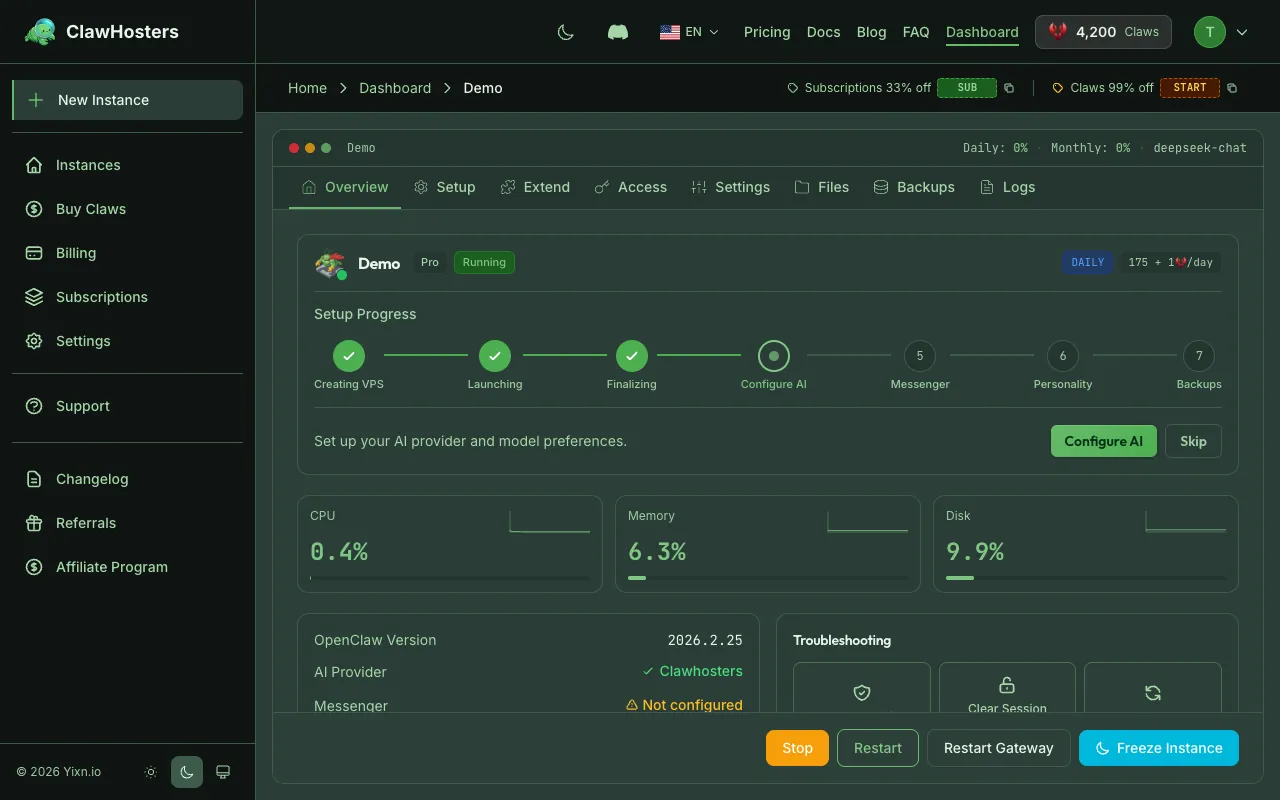
The available actions depend on your instance's current status. Buttons only appear when the action is possible.
Starting an Instance
If your instance is stopped, click Start in the instance dashboard header.
Starting powers on the existing Hetzner VPS. Your data, configuration, and messaging channels are preserved exactly as they were when you stopped it. The instance keeps its IP address and subdomain.
Once started, the instance transitions to Running and begins incurring daily Claws costs again.
Requirements:
- Instance must be in Stopped status
Stopping an Instance
If your instance is running, click Stop in the instance dashboard header.
Stopping powers off the Hetzner VPS but keeps it allocated to your account. Your server, IP address, and all data remain intact. You can start it again at any time.
What happens when you stop:
- The instance status changes to Stopped
- Messaging channels (Telegram, WhatsApp, etc.) disconnect
- The web gateway becomes inaccessible
- The VPS remains allocated to your account and daily billing continues.
When to stop vs. freeze vs. delete:
- Stop when you plan to use the instance again soon. The VPS stays allocated and starts up instantly, but billing continues at the full rate.
- Freeze when you want to keep the instance but reduce costs. The VPS is deleted and a snapshot is saved. Billing drops to 15 Claws/day. Unfreezing creates a new server with a new IP address.
- Delete when you no longer need the instance. The VPS is permanently removed and billing stops.
Restarting an Instance
If your instance is running, click Restart in the instance dashboard header.
Restarting reboots the Hetzner VPS. The instance stays in Running status throughout and continues to incur daily costs. Use this when the instance is unresponsive or behaving unexpectedly.
The restart takes a few seconds. Messaging channels briefly disconnect and reconnect automatically.
Automatic Pausing (Low Balance)
If your Claws balance drops below zero after the daily billing deduction (processed at 01:00 Berlin time), the system automatically pauses your instance.
What happens during automatic pause:
- A snapshot of your instance is created (preserving all data and configuration)
- The Hetzner VPS is deleted (freeing the IP address and server resources)
- Daily billing stops
- You receive an email notification
Your data is safe in the snapshot. Nothing is lost.
Grace period: Paused instances have a 3-day grace period. During this time, you receive daily countdown emails. After 3 days without resuming, the snapshot and instance data are permanently deleted.
Resuming a Paused Instance
To resume a paused instance:
- Add Claws to your account (Dashboard → Add Funds)
- Return to the instance dashboard
- Click Resume
The system restores your snapshot to a new Hetzner VPS. This takes about 30-60 seconds. Your instance gets a new IP address but all data and configuration are preserved.
Resume is blocked when:
- Your Claws balance is still insufficient
- A payment failure is pending on a monthly subscription
Stopped vs. Paused
These two states both halt your instance, but they work differently:
| Stopped | Paused | |
|---|---|---|
| Trigger | Manual (you click Stop) | Automatic (low Claws balance) |
| VPS | Kept allocated (same IP) | Deleted (new IP on resume) |
| Data | On the VPS disk | In a snapshot |
| Resume speed | Instant | 30-60 seconds |
| Billing | Full daily charges continue | No daily charges |
| Grace period | None. Stays stopped indefinitely. | 3 days before permanent deletion |
Key difference: Stopping keeps your VPS reserved with its IP address, but daily billing continues at the full rate. Pausing deletes the VPS and saves a snapshot, which stops billing entirely but means you get a new IP address when you resume. To reduce costs without losing your instance, consider freezing instead (15 Claws/day).
Billing Impact
| Action | Cost Impact |
|---|---|
| Start | Daily Claws charges resume |
| Stop | Daily charges continue (VPS stays allocated) |
| Restart | No change. Charges continue. |
| Freeze | Reduced rate (15 Claws/day) |
| Paused | Daily charges stop |
| Resume | Daily Claws charges resume |
| Delete | All charges stop |
Daily costs depend on your tier:
| Tier | Daily Cost |
|---|---|
| Budget | 60 Claws |
| Balanced | 105 Claws |
| Pro | 175 Claws |
Low Balance Warnings
The system sends warning emails when your balance falls below 3, 2, and 1 day of operating costs. These warnings give you time to add Claws before automatic pausing kicks in.
You can check your current balance and estimated remaining days on the main dashboard.
Monthly Subscription Instances
Monthly subscription instances work differently from daily billing instances:
- No automatic pausing for low Claws balance (billing goes through Stripe directly)
- If a Stripe payment fails, the instance is paused automatically
- Daily reminder emails are sent while the payment remains failed
- Resume is blocked until the payment issue is resolved
- If Stripe cannot collect payment after its retry period, the subscription is cancelled and the instance is deleted
To manage your subscription, use the billing portal link on the instance dashboard.
Related Documentation
- Instance Overview. Instance statuses, lifecycle, and tiers
- Billing Overview. How billing, Claws, and payments work
- Adding Funds. How to add Claws to your account
- Troubleshooting Common Issues. Solutions for frequent problems
Related Documentation
Instance Overview
What Is an Instance? An instance is a dedicated OpenClaw server running on ClawHosters. It is yo...
Instance Won't Start
When Your Instance Refuses to Start If your instance is stuck or fails to start after pressing "...
Deleting an Instance
Overview Deleting an instance permanently removes the server and all data. The Hetzner VPS is de...
