
Loading...
> docs/choose-tier
Choosing the Right Tier
4 min read
Getting Started
Last updated March 12, 2026
Available Tiers
ClawHosters offers three server tiers. Each tier runs the same OpenClaw software with the same features. The difference is how much CPU, memory, and storage your instance gets.
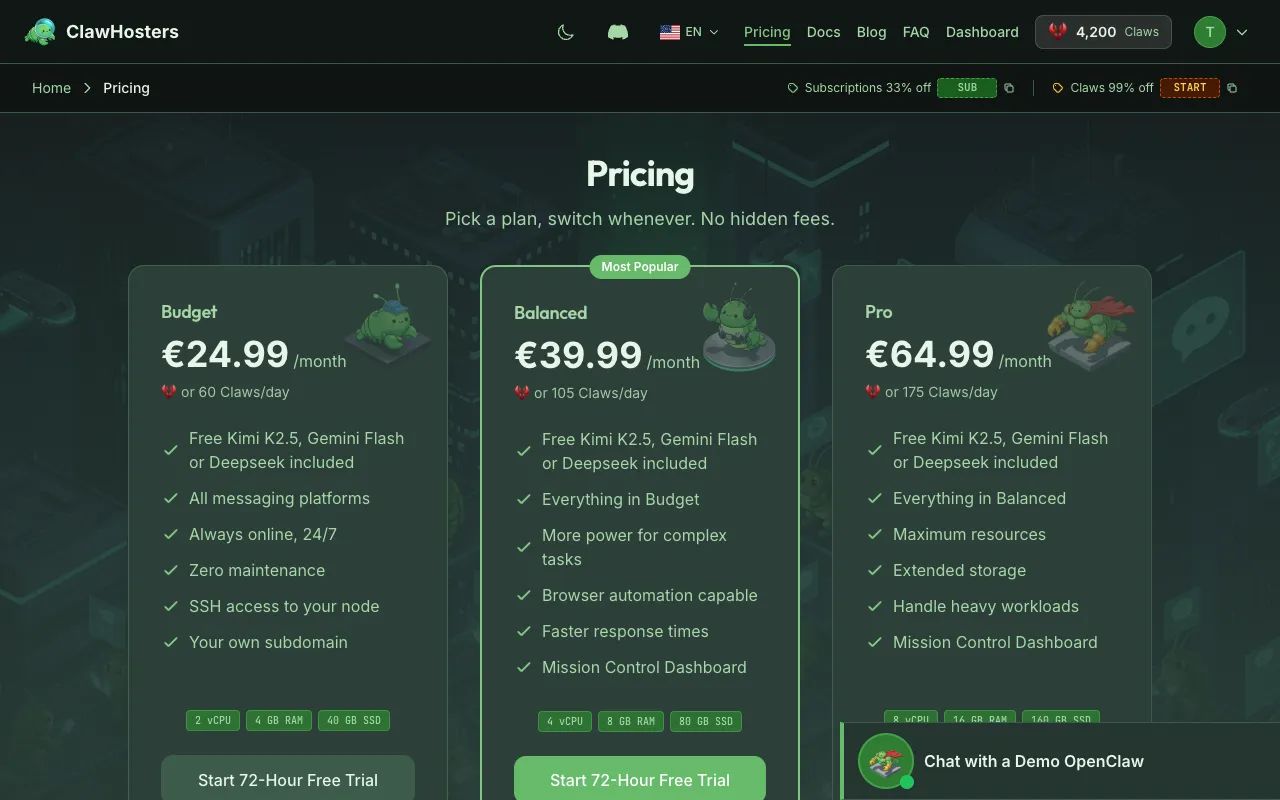
| Budget | Balanced | Pro | |
|---|---|---|---|
| vCPUs | 2 | 4 | 8 |
| RAM | 4 GB | 8 GB | 16 GB |
| Storage | 40 GB | 80 GB | 160 GB |
| Monthly price | €19/mo | €35/mo | €59/mo |
| Daily (Claws) | 60 Claws/day | 105 Claws/day | 175 Claws/day |
| Setup fee (daily billing) | 150 Claws | 300 Claws | 450 Claws |
All tiers include the same channels (Telegram, WhatsApp, Discord, Slack), the same LLM support, and the same management dashboard.
The monthly prices (€19/€35/€59) cover everything for standard usage. Claws are only needed if you choose daily billing or exceed your free managed LLM usage limits.
Monthly vs Daily Billing
You pick a billing mode when creating your instance. Both have trade-offs.
Monthly subscription: Fixed €19/€35/€59 per month via Stripe. Predictable cost, no setup fee, billed at the start of each period. Best if you plan to run the instance continuously.
Daily billing (Claws): Pay per day from your Claws balance. Costs 60/105/175 Claws per day depending on tier. One-time setup fee of 150/300/450 Claws. Best if you want flexibility to pause and resume without committing to a monthly charge.
Daily billing deducts from your balance every day at midnight UTC. If your balance runs too low, the instance gets paused automatically (you get warnings at 3, 2, and 1 days before it would run out). You can resume anytime by adding more Claws.
Which Tier to Pick
Budget (2 vCPU, 4 GB RAM)
Good for: - Personal use with a single messaging channel - Light conversation load (a few dozen messages per day) - Trying out OpenClaw before committing to a larger plan
Not ideal for: - Running multiple channels simultaneously with heavy traffic - Workloads that need fast response times under load
Balanced (4 vCPU, 8 GB RAM)
Good for: - Multiple messaging channels running at the same time - Moderate conversation load (hundreds of messages per day) - Using voice transcription or embeddings alongside regular chat
This is the most commonly chosen tier. It handles most use cases without the cost of the Pro tier.
Pro (8 vCPU, 16 GB RAM)
Good for: - High message volume across multiple channels - Running resource-heavy features (embeddings, voice transcription, browser tools) - Situations where response time matters (customer-facing bots)
The extra CPU and memory help when the instance is processing multiple requests in parallel or running tools that require more resources (like Playwright for web browsing).
Can I Change Tiers Later?
It depends on your billing mode.
Monthly subscription: You can upgrade or downgrade your tier from the instance settings. The change triggers a redeployment: your instance is stopped, the server is replaced with one matching the new tier, and your configuration and data are preserved. Downtime during a tier change is typically under 2 minutes.
Daily billing: The tier is locked for the lifetime of the instance. To switch tiers on daily billing, you would need to create a new instance on the desired tier.
What Happens When I Hit Resource Limits
If your instance runs out of memory, the Docker container restarts automatically. You'll see a brief interruption (a few seconds). If this happens frequently, it's a sign you should move to a higher tier.
CPU limits are softer. Your instance shares the physical server with others. Under sustained load, responses may slow down but the instance keeps running.
Storage is usually not a concern unless you store large files inside the instance. The base OpenClaw installation uses a few hundred MB. Most of the storage is available for conversation data, logs, and any files your skills generate.
Cost Comparison
Here's what each tier costs over different time periods:
| Period | Budget | Balanced | Pro |
|---|---|---|---|
| 1 day | 60 Claws (~€0.92) | 105 Claws (~€1.62) | 175 Claws (~€2.69) |
| 1 week | 420 Claws (~€6.46) | 735 Claws (~€11.31) | 1,225 Claws (~€18.85) |
| 1 month (daily) | ~1,800 Claws (~€27.69) | ~3,150 Claws (~€48.46) | ~5,250 Claws (~€80.77) |
| 1 month (subscription) | €19 flat | €35 flat | €59 flat |
The daily Claws route costs more per month than a subscription because you pay for flexibility. If you know you will run the instance every day, the monthly subscription is the better deal.
Related Docs
- Understanding Claws (Credits): How the credit system works
- Quickstart Guide: Full setup walkthrough
- Creating Your First Instance: Step-by-step instance creation
Related Documentation
Understanding Claws (Credits)
What Are Claws? Claws are optional. Most users run monthly subscriptions and never need Claws. Yo...
Billing Overview
How Billing Works ClawHosters offers two billing modes: monthly subscriptions and daily Claws bi...
Creating Your First Instance
What You'll Set Up An instance is a dedicated server running OpenClaw, provisioned exclusively f...
