
Loading...
> docs/llm
LLM Add-on (BYOK vs Managed)
7 min read
Addons
Last updated March 22, 2026
How LLM Works on ClawHosters
Every OpenClaw instance can use a large language model for conversations, tasks, and automations. ClawHosters gives you two ways to connect one: bring your own API key or use a managed pack.
BYOK (Bring Your Own Key)
BYOK lets you use API keys you already have from providers like Anthropic, OpenAI, or Google. ClawHosters does not charge anything for BYOK. You pay your provider directly.
Supported Providers
- Anthropic: Claude Opus, Sonnet, Haiku
- OpenAI: GPT-4, GPT-4 Turbo, GPT-3.5, o1
- Google AI: Gemini models
- DeepSeek: DeepSeek V3 and others
- OpenRouter: Access to multiple providers through a single key
- Mistral: Mistral models
- Groq: Fast inference models
Setting Up BYOK
- Open your instance in the ClawHosters dashboard
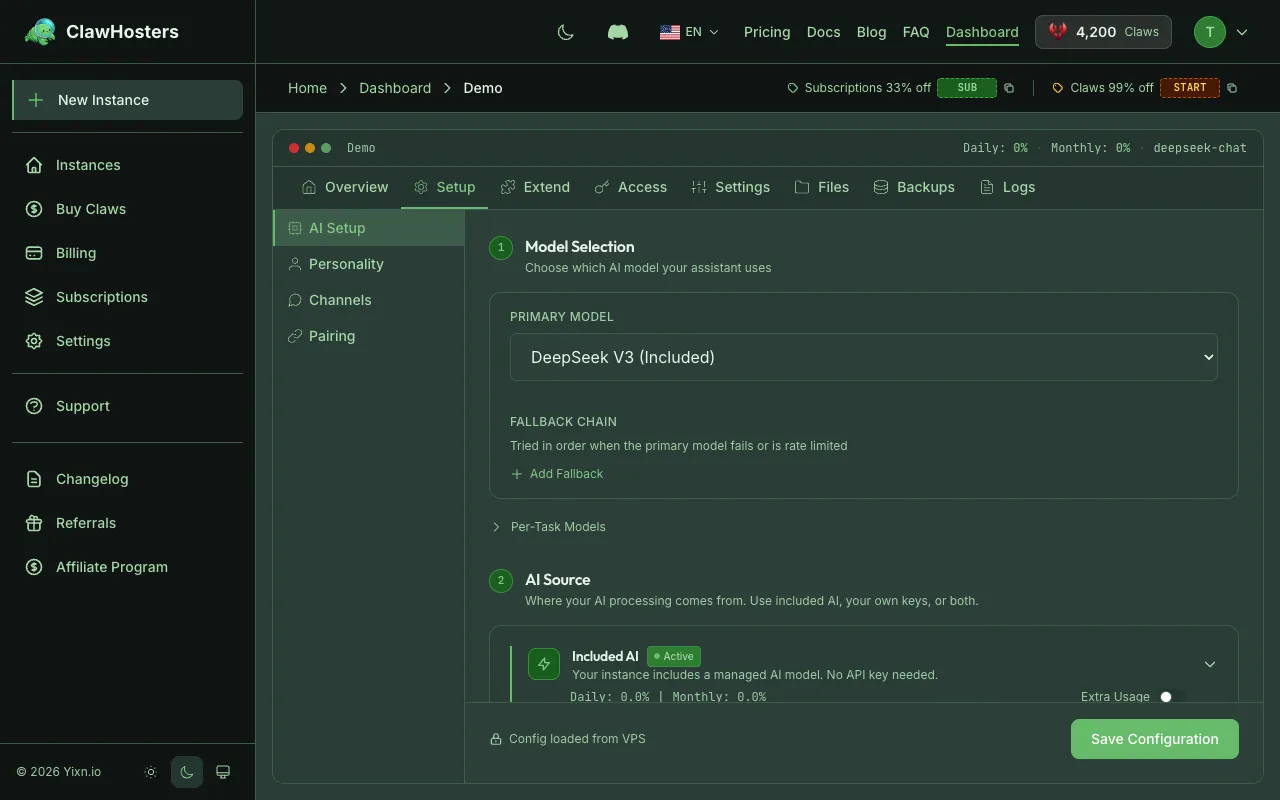
- Go to the AI Setup tab
- Under Your API Keys (BYOK), click Add Provider
- Choose your provider from the dropdown
- Paste your API key
- Click Save
The system runs a quick test call against your provider to confirm the key works. If verification succeeds, your instance is ready to use that provider's models.
Info: API keys are encrypted at rest. ClawHosters never stores them in plain text.
Why Choose BYOK
- No extra cost from ClawHosters
- Use any model your provider supports, including the latest releases
- No token limits on the ClawHosters side (your provider's limits apply)
- Good for teams that already have API agreements with a provider
Managed Packs
If you do not have your own API keys or want a simpler setup, managed packs give you a fixed monthly token allowance at a set price. ClawHosters handles the API keys and routing.
Available Tiers
| Tier | Model | Best For |
|---|---|---|
| Eco | DeepSeek V3 | General tasks, best value per token |
| Standard | Gemini Flash-Lite | Fast responses, reliable performance |
| Premium | Claude Haiku | Complex reasoning, nuanced conversations |
Each tier uses a specific model. You cannot swap models within a tier.
Pricing and Token Allowances
Eco (DeepSeek V3)
| Pack | Tokens/Month | Monthly Price |
|---|---|---|
| Starter | 1,000,000 | €3 |
| Standard | 5,000,000 | €10 |
| Pro | 15,000,000 | €25 |
Standard (Gemini Flash-Lite)
| Pack | Tokens/Month | Monthly Price |
|---|---|---|
| Starter | 1,000,000 | €5 |
| Standard | 5,000,000 | €15 |
| Pro | 15,000,000 | €40 |
Premium (Claude Haiku)
| Pack | Tokens/Month | Monthly Price |
|---|---|---|
| Starter | 1,000,000 | €12 |
| Standard | 3,000,000 | €30 |
| Pro | 8,000,000 | €70 |
Setting Up a Managed Pack
- Open your instance in the ClawHosters dashboard
- Go to the AI Setup tab
- Under Included AI, select Managed Pack
- Choose a tier (Eco, Standard, or Premium)
- Choose a pack size (Starter, Standard, or Pro)
- Confirm your subscription
The LLM is available immediately after subscribing. Token usage starts counting from the first request.
Token Tracking
Every LLM request is tracked in real time. Both input tokens (what you send) and output tokens (what the model responds) count toward your pack limit.
You can check your current usage on the AI Setup tab in the dashboard:
- Tokens used: How many tokens you have consumed this period
- Tokens remaining: How many you have left in your pack
- Usage percentage: A visual indicator of consumption
What Happens When You Run Out
If your managed pack runs out of tokens, further LLM requests return an error until:
- Your pack resets at the start of the next billing period
- You upgrade to a larger pack
Your instance keeps running normally. Only LLM requests are affected. All other features (messaging, channels, automations) continue working.
Info: BYOK subscriptions do not have token limits on the ClawHosters side. Usage is tracked for your reference but never blocked.
BYOK vs Managed: Quick Comparison
| BYOK | Managed Pack | |
|---|---|---|
| Cost | Free (you pay your provider) | €3–70/month |
| Model choice | Any model your key supports | Fixed model per tier |
| Token limits | None from ClawHosters | Pack-based (1M–15M) |
| Setup | Add your API key | Subscribe to a pack |
| Best for | Power users, specific model needs | Simplicity, predictable costs |
Model Privacy and Jurisdiction
When your instance sends a prompt to an LLM, that request leaves your German VPS and goes to the model provider's servers. Where those servers are and how the provider handles your data depends on the model.
Included Models (Free with Every Plan)
These models are available on every ClawHosters plan at no extra cost. ClawHosters pays for the API access.
| Model | Provider | HQ / Jurisdiction | Subject to US CLOUD Act | Data Training | Servers in China |
|---|---|---|---|---|---|
| Gemini 2.5 Flash Lite | USA | Yes | No (paid API usage excluded per Google's API terms) | No | |
| DeepSeek R1 | DeepSeek | China (Hangzhou) | No | Policy less transparent, check current API terms | Yes |
| DeepSeek V3 (Chat) | DeepSeek | China (Hangzhou) | No | Policy less transparent, check current API terms | Yes |
| Kimi K2.5 | Moonshot AI | China (Beijing) | No | Policy less transparent, check current API terms | Yes |
Google's API terms state that paid API data is not used for model training. Since ClawHosters pays for Gemini API access, your usage counts as paid and falls under this exclusion.
DeepSeek and Moonshot AI have less transparent data handling policies. Their API terms can change. If this matters to you, verify their current terms directly.
Managed Pack Models
| Model | Provider | HQ / Jurisdiction | Subject to US CLOUD Act | Servers in China |
|---|---|---|---|---|
| DeepSeek V3 (Eco tier) | DeepSeek | China (Hangzhou) | No | Yes |
| Gemini Flash-Lite (Standard tier) | USA | Yes | No | |
| Claude Haiku (Premium tier) | Anthropic | USA | Yes | No |
Anthropic states that API data is not used for training by default.
BYOK Provider Jurisdictions
| Provider | HQ | Subject to US CLOUD Act | EU-Based |
|---|---|---|---|
| Anthropic (Claude) | USA | Yes | No |
| OpenAI (GPT) | USA | Yes | No |
| Google AI (Gemini) | USA | Yes | No |
| DeepSeek | China | No | No |
| Mistral | France | No | Yes |
| OpenRouter | USA | Yes | No |
| Groq | USA | Yes | No |
EU-Compliant Alternative
If EU jurisdiction matters to you, Mistral is the strongest option among supported BYOK providers. Mistral is a French company with servers in the EU, fully GDPR-compliant, and not subject to the US CLOUD Act or Chinese data laws. You can get an API key at mistral.ai and add it under AI Setup > Your API Keys (BYOK). BYOK is free on our end.
What ClawHosters Controls
Your instance infrastructure runs on Hetzner Cloud in Germany. Chat history, configuration, and all stored data stay in Germany. ClawHosters routes LLM requests through our infrastructure but does not store prompt content or responses. The distinction is: your data at rest stays in Germany, but inference happens at the model provider's servers.
For full details on data handling, see Data Handling and Privacy.
Provider Failover
For managed packs, if the primary provider experiences downtime, the system automatically routes requests through a backup provider. This happens transparently. You do not need to do anything. Response quality stays the same because the backup uses an equivalent model.
BYOK requests use your key directly and do not have automatic failover.
Troubleshooting
"No LLM configured" error
- Verify you have an active LLM subscription or BYOK credential for this instance
- Check the AI Setup tab to confirm the subscription status is "Active"
BYOK key verification failed
- Double-check that you copied the full API key without extra spaces
- Make sure the key has not been revoked or expired at your provider
- Confirm the key has the correct permissions (most providers require at least chat/completions access)
"Usage limit exceeded" on managed pack
- Your pack's token allowance for this period is exhausted
- Upgrade to a larger pack or wait for the next billing cycle
- Consider switching to BYOK if you regularly exceed your limit
Slow responses
- Eco tier (DeepSeek) and Standard tier (Gemini) are generally fast
- Premium tier (Claude Haiku) may have slightly higher latency for complex requests
- Network conditions between ClawHosters infrastructure and the provider can affect speed
Related Docs
- Custom LLM Providers: Use any OpenAI-compatible provider (Featherless, Together AI, Ollama, etc.)
- Understanding Claws (Credits): How the credit system works
- Billing Overview: Monthly vs daily billing explained
- Instance Overview: What runs inside your instance
Related Documentation
What is ClawHosters?
Managed OpenClaw Hosting ClawHosters is a managed hosting platform for OpenClaw AI assistants. Y...
Quickstart Guide
Before You Start You need a ClawHosters account. If you haven't signed up yet, head to clawhoste...
Custom LLM Providers
Using Custom LLM Providers The AI Setup tab lists common providers like Anthropic, OpenAI, Googl...
