
Loading...
> docs/billing-overview
Billing Overview
4 min read
Billing
Last updated March 12, 2026
How Billing Works
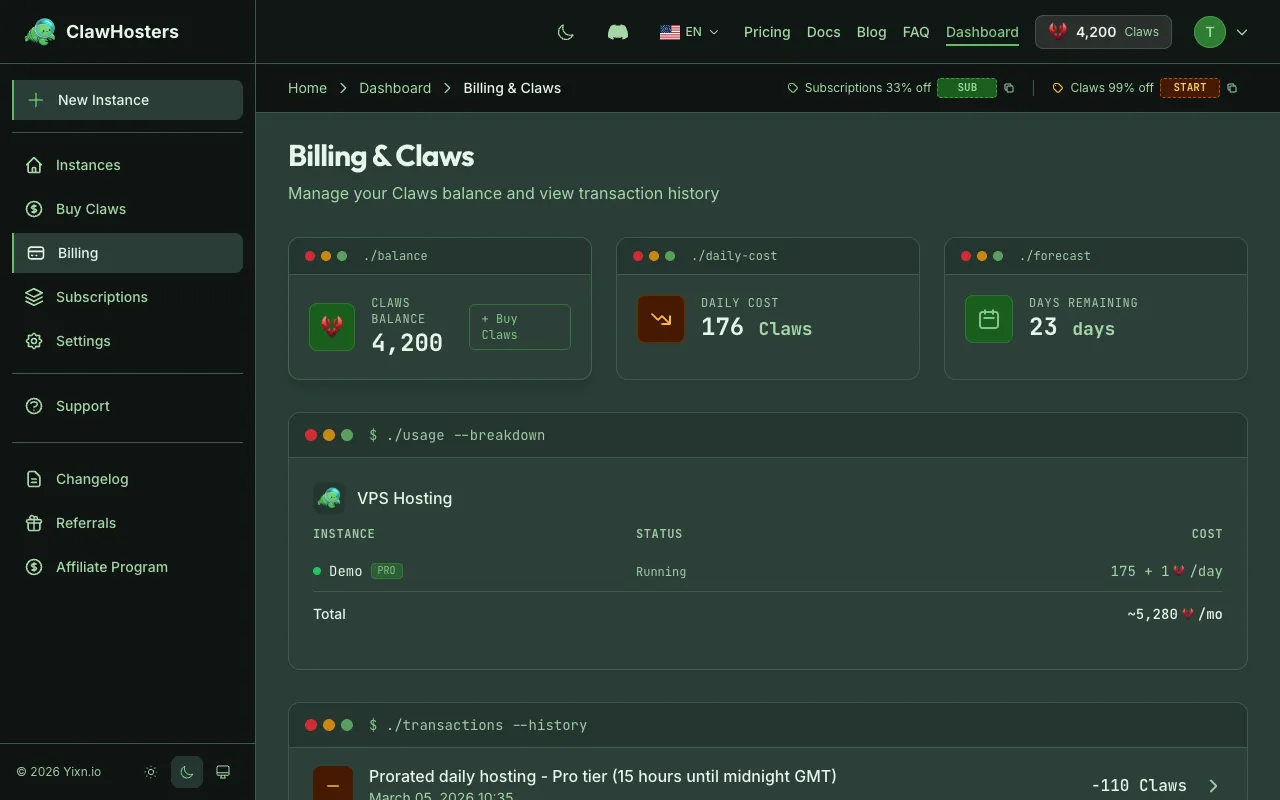
ClawHosters offers two billing modes: monthly subscriptions and daily Claws billing. You choose the mode when you create an instance, and each instance can use a different mode.
Most users choose a monthly subscription. It is the simplest option and covers everything you need for standard usage.
Both modes give you the same features, channels, and performance. The difference is how and when you pay.
Monthly Subscription (Recommended)
A fixed monthly charge via Stripe. You pay at the start of each billing period and the instance runs for the full month regardless of usage.
| Tier | Monthly Price |
|---|---|
| Budget | €19/month |
| Balanced | €35/month |
| Pro | €59/month |
How it works: - Stripe charges your card at the start of each period - The instance runs continuously until you cancel - Cancellation stops billing at the end of the current period (no mid-month refunds) - No setup fee
Best for: Running an instance every day without worrying about balance management.
Daily Billing (Claws)
Pay-as-you-go using Claws, the prepaid credit currency. Your balance is deducted daily at 01:00 Berlin time (CET/CEST) based on the tier.
| Tier | Daily Cost |
|---|---|
| Budget | 60 Claws/day |
| Balanced | 105 Claws/day |
| Pro | 175 Claws/day |
How it works: - Buy Claws packages in advance (€10 to €160 per package) - Every day at 01:00 Berlin time (CET/CEST), the daily cost is deducted from your balance - A one-time setup fee is charged when you create the instance (150/300/450 Claws depending on tier) - If your balance runs too low, the instance is paused automatically
Best for: Flexibility to pause and resume without a monthly commitment.
Low Balance Warnings
On daily billing, the system warns you before your balance runs out:
| Warning | When |
|---|---|
| Low balance email | 3 days of Claws remaining |
| Urgent warning email | 2 days of Claws remaining |
| Final warning email | 1 day of Claws remaining |
| Instance paused | Balance hits zero |
"Days remaining" is calculated based on your current daily burn rate across all running instances.
What Happens When You Run Out of Claws
If your balance drops to zero:
- The system takes a snapshot of your instance (saves all data and configuration)
- The Hetzner server is shut down
- Your instance status changes to Paused
- No further charges occur while paused
You have 3 days to add more Claws. After 3 days, the snapshot is deleted and the instance data is permanently lost.
To resume: buy more Claws and the system automatically detects your balance is sufficient again, restores the snapshot to a new server, and your instance continues where it left off. No manual action needed beyond purchasing Claws.
Invoices
ClawHosters generates invoices for all transactions:
- Claws purchases (one-time payments)
- Monthly subscription charges
- Setup fees
Invoices are available in your dashboard under Billing > Invoices. Each invoice shows the amount in EUR, the number of Claws (if applicable), and the date.
Invoices are generated in compliance with German tax law and retained for 10 years.
Payment Methods
Stripe: Credit card, debit card. Used for both subscriptions and one-time Claws purchases.
Crypto (Coinbase Commerce): Bitcoin, Ethereum, and other supported cryptocurrencies. Available for Claws purchases only (not subscriptions).
Managed LLM and Extra Usage
Every instance includes a free managed LLM subscription with daily and monthly usage limits. Under normal usage, you never pay extra for AI features.
If you exceed the free tier limits, extra usage is billed in Claws from your account balance. Monthly subscription users get a one-time Claws bonus the first time they hit their limit (Budget: 100, Balanced: 200, Pro: 350 Claws). This bonus covers occasional spikes. If you regularly exceed the free tier, you can purchase additional Claws packages.
Daily billing users already maintain a Claws balance, so extra LLM usage is simply deducted from that balance.
For full details, see Understanding Claws.
Add-on Billing
Add-ons (LLM managed packs, voice transcription, embeddings, backups) are billed separately from the base instance cost:
- Add-on subscriptions are monthly, managed through Stripe
- Add-on costs appear as separate line items on your invoice
- Cancelling an add-on takes effect at the end of the current billing period
See the individual add-on documentation for specific pricing.
Switching Billing Modes
You cannot switch an existing instance between monthly and daily billing. To change modes:
- Create a new instance with the desired billing mode
- Configure it with the same settings as the old instance
- Delete the old instance
Your messaging channels and LLM credentials need to be set up again on the new instance.
Related Docs
- Understanding Claws (Credits). How the credit system and packages work
- Understanding Your Invoice. Invoice types, formats, and how to download
- Choosing the Right Tier. Tier comparison and pricing details
- Payment Methods. Accepted payment options and security details
- Cancellation and Refunds. How to cancel, refund policy, and grace periods
- Instance Overview. Instance lifecycle and statuses
Related Documentation
Understanding Claws (Credits)
What Are Claws? Claws are optional. Most users run monthly subscriptions and never need Claws. Yo...
Adding Funds (Top-up)
When You Need to Add Funds This page is for daily billing users. If you use a monthly subscriptio...
Choosing the Right Tier
Available Tiers ClawHosters offers three server tiers. Each tier runs the same OpenClaw software...
